Free disc golf tee sign template
Most tee sign templates are a blank box where you paste a screenshot and type the distance. DiscMap works the other way round: you draw the hole once on a real map, and the sign — map, par, distance for every tee layout, notes, sponsor and QR code — is generated from it. It is free, runs in your browser and needs no account.
What belongs on a disc golf tee sign
A tee sign has one job: tell a player who has never seen the hole where to throw and what to avoid, in the few seconds before they tee off. The ones that do it well carry the same handful of things.
- The hole number, large enough to read from the fairway of the previous hole.
- Par and distance for every tee layout the hole plays — long and short, or red, white and blue — not just one.
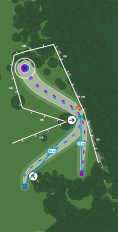
- A map of the hole: tee, basket, the flight line (bent around the dogleg if it has one), and the trees and paths that shape it.
- Everything the rules care about: OB lines and areas, mandos, drop zones and hazards, drawn where they really are.
- A short note for what the map cannot show — a blind basket, a road behind the green, a safety warning.
- Optionally a sponsor, and a QR code to the course page so players can see the next hole on their phone.
Six layouts, one print colour
DiscMap ships six sign layouts. The map is always the biggest thing on the page; what changes is how the course name, hole number and stats sit around it — a classic header and footer, a dark side panel with a huge hole number, a full-bleed map with floating cards, a high-contrast tournament ticker, a quiet framed map, or a dense trail-style sidebar with one row per layout.
You pick one print colour per course and every sign, the info board and the caddie book derive their palette from it, so a set printed months apart still matches.
Sizes and print files
Tee signs export in A4 or US Letter, portrait or landscape, and the whole-course info board at 18 × 24 inches. Everything is a vector PDF: the map is drawn as shapes, not a screenshot, so a sign shop can print it at any size without the lines or text going soft.
Distances can print in metres, in feet, or both side by side when your visitors are split. Ask your sign shop what margin and material they want — most outdoor signs are printed on aluminium composite with a UV laminate — and send them the PDF as it comes out.
How to make one
- Start a course and search for your park. The paths, woods, water and buildings around it are imported from OpenStreetMap.
- Click to place each tee and basket. The fairway line draws itself; drag its control points to follow the dogleg.
- Add the OB, mandos, drop zones and trees that matter to the line, and a note for the hole.
- Open Signage, pick a layout and your print colour, and check each hole's sign.
- Export the PDFs. Move a basket later and the distance and map on its sign follow — re-export only the signs that changed.
Why a template filled from a map beats a blank one
A blank template in a design app is fine for one sign. For eighteen, it means eighteen screenshots cropped by hand, eighteen distances typed in (and re-measured, and re-typed, when a basket moves), and a set that slowly drifts out of step with the course. When the sign is generated from the map, the distance is measured from where the tee and basket actually are, and the whole set updates together.
Questions
- Is the tee sign template really free?
- Yes. Designing and exporting tee signs in DiscMap is free, with no watermark and no account. You pay only your sign shop for printing.
- Can I use my own text and sponsor logos?
- Yes. Each hole has its own description, and you can upload sponsor logos once and choose which signs carry them.
- Can one sign show several tee positions?
- Yes. A sign lists par and distance for every layout the hole plays, and a tee or basket shared by several layouts is drawn in each of their colours.
- What file do I send to the printer?
- A vector PDF per sign, in A4 or Letter. The info board exports at 18 × 24 inches. Because the map is vector, the same file prints cleanly at larger sizes.